Archive

Posts Tagged ‘CPU’

All hail the “const” parameters!

July 28th, 2010

Passing parameters as “const” is a classic Delphi optimization trick, but the mechanisms behind that “trick” go beyond cargo-cult recipes, and may actually stumble into the “good practice” territory.

Why does it work?

The most well known case is “const String“, for which the compiler than takes advantage of the “const” to pass the String reference directly (as a pointer)… and without increasing the reference counter.

To illustrate what the reference counting implies, here are two screen-shots from the CPU disassembly view, taken in Delphi 6, but the recent compilers up to Delphi 2010 at least behave in a similar fashion (just with the Unicode version of the functions).
I’ve made a pseudo-function, with only one String parameter that calls a single function (here Length(), which isn’t inlined in Delphi 6, and corresponds to LStrLen), guess which CPU disassembly corresponds to “Test(const a : String)” and which to “Test(a : String)

What you’re seeing on the left is an implicit try…finally construct which is used to protect the reference counting (LStrAddRef/LStrClr) on the implicit local variable used to store the String parameter. If you have such calls nested a few levels deep (not uncommon in object-oriented code), you could accumulate quite some overhead.
Also not see here but hidden within the AddRef and Clr calls are bus locks, which may hit you disproportionately in multi-threading scenarios.

And what if you’re modifying the passed String? Can you forego the “const“? Well no, the extra overhead is still there, and using a “const” still beneficial.

String isn’t the only type affected, there are similar gains for all reference counted types (interfaces, dynamic arrays, records holding reference-counted types). And when passing a record as “const“, there is an additional gain in the lack of defensive copying of the record (the larger the record, the greater the gain).

For ordinal and numeric types, there is no compiler optimization (yet), but it can be good practice to mark them as “const“, not in the optimistic hope that someday the compiler will optimize it, but to ease up debugging and code writing. Copies of those parameters (when you want to modify them in the function body) are typically handled adequately by the compiler (and often enough comes for free), so don’t let performance considerations hold you.

There is one case in which using “const” could have adverse effects, but it involves global variables which you would modify or release during the call… so you don’t really need to know more about it, do you? ;)

How does it manifests itself in Profiling?

A missing “const” can manifests itself in different ways during profiling, for String, Interface and dynamic array types, you’ll usually see it via the relevant xxxAddRef or xxxClr functions (the obvious case) and via time spent in begin/end (the less obvious case). Depending on how many functions calls with the reference counting are involved in your inner loop, none of the above may come ahead, even if calls and reference counting are an issue: the time spent will be spread over the above functions and your various begin/end sections.
For record parameters, the lack of “const” could materialize itself in “Move“, or other data copying costs (large records will be moved, smaller ones can be copied via ad-hoc in-place code by the compiler).

In multi-threading, things can be a little less obvious, as rather than the reference counting and exception frame, it could be the bus locks hitting you, or sometimes worse, inter-CPU traffic to pass around the values of the reference counter.

Multi-threading’s worst case would be referring to the same string field from multiple threads, and passing that string around in functions without “const” parameters, thus repeatedly hitting the reference counter of that string from multiple threads at the same time, resulting in extra inter-CPUs traffic to share the value of that reference counter.

In such cases, “const” can help, but it will often not be enough, you’ll also have to look for functions/methods that return strings with an unnecessary reference counting, like when getting your strings from a TStringList.

Good Practice

Usually I tend to “const” just about every parameter that isn’t “var” or an object, this isn’t just  to pre-emptively alleviate possible performance issues, but also to gain something valuable when debugging and writing a function’s body: untouched input parameters, wherever you are in the function’s body. This means not just in the function’s body, but also when in the functions called by the function.

And that’s the key point to remember about “const” parameter: it’s here to state that a parameter will be left unchanged inside the body, something which allows the compiler to optimize it’s output, and the developer to optimize his thought process too. Qualifying all your parameters as either “const” or “var” makes your intentions obvious.

So IME, it’s not worth it to hoard your keystrokes, best spend them on “const” and explicit local variables when you really need to alter those input parameters.
Whoever has to maintain your code will be thankful.

Object parameters

There is one case I’ve not mentioned in all the above, the case of object parameters (and class references). It’s a special case because when you pass an object as “const“, you’re not making any promises of not keeping the object constant, but just keeping the underlying variable (pointer) constant. This is unlike other languages. There is also a risk of confusion when your code will be read by developers not really familiar with the underlying pointer-based mechanics of objects (and they are more common than you may think, even, and maybe more so in highly OO languages).

So for objects, unless you want to spend a lot of time educating, my rule of thumb is to avoid “const” or “var” for object parameters.

Beyond “const” parameters

Const’ing your parameters will eliminate some defensive copying, implicit try…finally, and reference counting overhead, but it leaves open another field of similar inefficiencies: that of return values.

Alas there is no “const Result” syntax, which would allow to state that your result can’t be altered in any way (a sort of strict immutability if you will). Thus whenever you have a function returning a String f.i., you’ll end up triggering the implicit reference counting and exception machinery if you’re not careful (like in this case)…

There are strategies to tackle this issue, but none of them are as simple as adding a “const“, and most of them come with sacrifices… so, let them be food for other articles.

Tips , , , , ,

Code Optimization: Go For the Jugular

May 6th, 2009

Code optimization can sometimes be experienced as a lengthy process, with disruptive effects on code readability and maintainability. For effective optimization, it is crucial to focus efforts on areas where minimal work and minimal changes will have to most impact, ie. go for the jugular


The Prey

I will illustrate this using SamplingProfiler in a small example, taken from a small library that deals with short vectors of varying length (but usually less than 10 dimensions), which I simplified, isolated & anonymized for the purpose of this article.

uses TypInfo;

type
   TDoWhat = (dwInc, dwDec);

procedure DoSomething1(var data : array of Integer; what : TDoWhat);
var
   i : Integer;
begin
   for i:=Low(data) to High(data) do
   begin
      case what of
         dwInc : Inc(data[i]);
         dwDec : Dec(data[i]);
      else
         raise Exception.Create('Unsupported: '+GetEnumName(TypeInfo(TDoWhat), Integer(what)));
      end;
   end;
end;


Get Meat into Belly

Before starting any kind of optimization, one has to define goals and limits, ie. figure out what “good enough” will be rather consider  “good enough” to be the state of the code one has grown tired of optimizing it!

The sample code above is quite straightforward and simple. It would of course be possible to blow this code to huge proportions for optimization’s sake. If you are after getting every last drop of CPU-cycle juice, and allow yourself to use every trick in the book, a fully optimized version could represent several thousandths of lines of code (I’m not exaggerating). If it’s your core business, it might be okay, but if it’s just a utility library, the increased maintainability issues could never be justified.

But since this article is intended more as an illustration than a discussion on the methodology, I’ll get straight to the buffalo (beef). For further reading on that subject, you can start from Big O Notation, Benchmarking and Software metrics articles in wikipedia, there are also whole books on the subject.


Stalking the Prey

Looking at the above code, the first obvious optimization that developers suggest seems to be taking the conditional out of the loop, resulting in several case-specific loops. On small vectors, this nets about a 30% speedup. For further speedups, the suggestions are typically to go for loop unrolling, asm, and other heavy-handed solutions that come with a significant development time and code complexity increase.

Of course, readers of this website will know better than to jump straight into the code and apply optimization recipes: they would run the code through a profiler first. And since we’re dealing with a single procedure, an instrumenting profiler would be of little help, so they would run Sampling Profiler instead, and would get to see something like this:

Going For The Jugular - Initial Profiling Results

In this run, only the dwInc case was stressed (line 37), and obviously the procedure spends less than 30% of its time doing what it was asked of, and most of its time (33%) on the “end“, ie. cleaning up, plus 8% setting up in “begin“. That’s 40%+ doing nothing but stack and setup/cleanup work!
The conditional in the loop that could have looked like the most worrying bit is eating a bit less than 20% of the time.

What is the source of all that begin/end work? Place a breakpoint on begin, run and hit Ctrl+Alt+C when your breakpoint is reached, go have a look at the CPU view, and you’ll see this:

Going For The Jugular - CPU view near "begin"

This is a fairly significant stack setup for such a small procedure, and those instructions with “fs:” at the bottom are the setting up of an (implicit) exception frame. An exception frame for what? if you haven’t guessed already, navigate your CPU view near the “end” line.

Going For The Jugular - CPU view near "end"

No wonder “end” was a bottleneck! The call to UStrArrayClr indicates that the exception frame is here to cleanup several strings… these strings are those of the raise Exception, one is the string returned by GetEnumName, the other is the result of the concatenation passed to Exception.Create.


Isolate and Kill

How to get rid of that exception frame? One typical way is to use “Exception.CreateFmt”, and pass only constant strings to it, but that is not possible here with the call to GetEnumName, which returns a string. The other way is to isolate the exception to its own (nested) procedure:

procedure RaiseUnsupported(what : TDoWhat);
begin
   raise Exception.Create('Unsupported: '+GetEnumName(TypeInfo(TDoWhat), Integer(what)));
end;

and call RaiseUnsupported in the “case else“. Doing so will move the exception frame to the new procedure, where it’s irrelevant in terms of performance.
This simple change nets us a 33% speedup, ie. we reclaimed most of the lost time in begin/end! We also gained a bit from the UStrArrayClr, which did essentially nothing since those strings it was used to clear weren’t defined (as long as we did not hit the exception).

Note that if you use a nested procedure for RaiseUnsupported, you can be tempted not to pass it the “what” parameter, but use directly the “what” from its parent procedure. However by doing so, you’ll have the compiler use a special stack setup (so that the nested procedure can access the parent procedure’s variables). This setup will be faster than the exception frame it replaces, but with it, begin/end would still be taking about 18% of the CPU time spent in the procedure.


Repeat Until Belly.Full;

Those first 33% were easily gained. Let’s go for another round of SamplingProfiler:

Going For The Jugular - Further Profiling Results

Things are more satisfying: the line performing the actual work is now taking up most of the CPU time. Second comes the case of line. For further speed improvements, we now need to move the conditional out of the loop:

procedure DoSomething3(var data : array of Integer; what : TDoWhat);

   procedure RaiseUnsupported(what : TDoWhat);
   begin
      raise Exception.Create('Unsupported: '+GetEnumName(TypeInfo(TDoWhat), Integer(what)));
   end;

var
   i : Integer;
begin
   case what of
      dwInc :
         for i:=Low(data) to High(data) do
            Inc(data[i]);
      dwDec :
         for i:=Low(data) to High(data) do
            Dec(data[i]);
   else
      RaiseUnsupported(what);
   end;
end;

We have increased the line count noticeably, but most of those extra lines are still cosmetic. What further makes it a reasonable trade-off is that the execution time has been reduced by 66% from the initial version, it now executes 3 times faster!

Are there any more easy gains to be had? Let’s run the last version through SamplingProfiler:

Going For The Jugular - Final Profiling Results

More than 92% of the execution time now goes to the loop and actual work. We got only a wee bit left for stack setup (line 96) and the case of (line 97). At this point, the above makes it clear that if you want to go faster you’ll have to increase the line count and code complexity significantly as you’ll need to replace the two-liner loops with something else, which is bound to be heavier (unrolling, SIMD, etc.)


Rest Under A Tree

Some quick final notes to conclude.

When moving an exception to a procedure, there are two things to keep in mind:

  • the exception will be triggered at another place in the code, to know where it was actually triggered, you’ll have to look up one step in your exception log stack trace… You do have an exception log stack trace in place, don’t you?
  • the compiler won’t “know” about the exception in the called procedure, so it will assume execution continues after your RaiseUnsupported, so you may want to place an Exit after it (which will never be reached), to avoid warnings and allow the occasional register optimization by the compiler.

In the final version, we gained more than the previous profiling run hinted at: the new code allowed the compiler to make better use of the registers. Ofttimes, getting the fat out of the way is all you need to see improvements.

If you check the CPU view, you’ll see everything is quite efficient now, but even then, using all the remaining tricks in the book could probably net noteworthy gains, just at a significant complexity increase. I didn’t try, but I would guess a 2x or 3x speed up should be about right.

If you were to need to go that route, SamplingProfiler could still help you there: on ASM code, you get profiling data down to the ASM instruction… but that’s food for another article.

Tips , , , , , ,

begin…end as bottlenecks?

March 25th, 2009

There will come a time when SamplingProfiler may report you that begin or end are your bottlenecks. This may sound a little surprising, but it’s actually quite a common occurrence, and something that instrumenting profilers are not going to point out, so it might be worth a little explanation.

This can be illustrated it with the minimalistic example of an array property getter. Witness the innocuous looking code below:

function TMyList.GetItem(index : Integer) : T;
begin
    if (index < 0) or (index >= Count) then
       Error(index);
    Result := FItems[index];
 end;

Nothing out of the ordinary there, you can find similar looking code in practically every array-based collection in the RTL and many third party libraries. But someday, that GetItem will be bottleneck, and you could be left looking at code profiling results like those:

begin-end-critical-01

Yes, those are the are the begin and end lines taking up more than 70% of the CPU time spent inside GetItem
You knew it! Sampling profilers are unreliable… or are they? Surely the index range checking must be the culprit? or the assignment and the reference counting business? Well, they could be, but in this case they aren’t.

To understand why, let’s have a look in the CPU view. Place a breakpoint on your begin, run up to there and hit Ctr+Alt+C, here is what you could see:

begin-end-critical-02

That’s a whole lot of traffic to the stack: 3 registers saved, 3 copies. Those things aren’t free, they can dwarf what your explicit code does, and in this example, they do. We didn’t even have any local variables, if we did, they would have taken setup and teardown code, and this code would have been “hidden” in begin and end too.

This illustrates a difference of sampling vs instrumenting profilers: the ability to pinpoint an actual bottleneck, even if it is “outside” of your explicit code, so you can find where the actual bottleneck is, and don’t waste time trying to optimize what isn’t critical.

Now what can you do to improve things locally? With generics, an interface type and Delphi 2009 sp2, nothing much, short of going BASM. The bottleneck code is compiler-generated, optimizing the assignment or the range checking would only provide minimal benefits. If you want to go faster, you’ll have to reduce the number of calls to GetItem, ie. open that “Show Callers” pane, have a look there, and solve the issue at the higher-level routines that are involved.

But there are other situations in which you can influence the auto-generated begin/end code, the solutions then typically revolve around distributing the code across smaller local functions or methods, tweaking your variable usage, separating branches, or if all else fails, going BASM… but that is food for future posts!

Tips , , , , , , ,

SamplingProfiler 1.6.0 out of the woods

March 20th, 2009

Version 1.6.0 of the Delphi sampling profiler is now available from its downloads page!

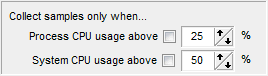
cpu-usage-optionsThe main addition is the ability to have sampling conditioned by CPU usage, ie. only gather profiling information when the CPU usage is high, either for the system or the process.
This was added with three goals in mind:

  • eliminate all that happens when the CPU isn’t busy from the profiling results, making it easier to focus on the CPU bottlenecks that matter.
  • gather profiling information only when the system is under stress, and find out if your code copes well with system stress… or is a poor OS citizen and just adds to the trouble.
  • identify sources of high CPU usage in your code, that could be reducing battery life when running on a mobile platform.

Note that CPU-usage based sampling can have the side-effect of eliminating I/O and other waits from the profiling results, so if your application’s bottlenecks aren’t CPU-based, you could miss them.

Other changes are support for the “Pause” key to pause profiling, time limit for sampling collection now starting from the first time sampling is enabled (rather than application start) and support for multi-selection when opening results.

This is also the first SamplingProfiler version compiled with Delphi 2009, oddities are not known at this point but expected. For all bug reports & suggestions, head to the forums.

News , , , , , ,

Website getting up to speed

March 17th, 2009
Comments Off

I’ve reorganized the site a bit since the relocation, tweaked WordPress behind the scenes, added OpenID support for comments and hopefully sorted out the over-aggressive spam filter.

The support forums are now also hosted here, no OpenID support for them just yet, but I’ll enable it as soon as it’s out of beta. For bug reports and features/suggestions, the forums are the place to post (easier to track things).

There will likely be a new SamplingProfiler release in the next days, which will add support for CPU-usage-based sampling, ie. profiling only takes place when the CPU usage goes above above a treshold (either at the system or the process level).

News , , , , ,

Saving results & merging

March 9th, 2009
Comments Off

SamplingProfiler run results can be saved to .spr files (Sampling Profiler Results) and later reused for comparison purposes, or for merging, one of the less obvious features of the profiler.
You can merge results by right-clicking on a results tab and selecting… “Merge results”, oddly enough. After this, the samples will be aggregated across the runs you selected, hopefully providing more statistical accuracy.

This can be particularly useful when analysing the results from multiple runs, collected from multiple users in the field via SamplingProfiler’s silent mode for instance. It can also be useful if you collect profiling information from automated test tools, each stressing the same library or base code in different ways.

Merging results isn’t as much about getting high numerical precision on your bottlenecks. Sure, you can use it for numerical accuracy, but who cares if a routine takes 95% or 92.24638% of the CPU time? identifying the bottleneck is usually all that matters.

Merging is about figuring out the bottlenecks that matter in everyday use, bottlenecks which may not come up in your routine tests, or may not be seen as critical when seen in isolation. It can be about getting information on that odd, hard-to-reproduce, slowdown your users may be experiencing from time to time. It can also be about identifying the minor bottlenecks that could be the cause of a “sluggish” feel to your UI.

A last word on the SPR files: those are persistence streams of SamplingProfiler native format, they’re binary, highly compact, and for you, the user, highly proprietary and blackboxy. If you want to do your own analysis on the profiling results, there is an alternative: you can save results as an XML file, which will include all the data in a verbose fashion. Be warned however that a deceptively small SPR can result in a huge XML file.

Tips , , , , , ,