A new DWScript 2.3 preview 2 7zip (422 kB) is available for download for those that don’t use the DWScript SVN. This version should be the last before a release candidate for 2.3. As the lead version is Delphi XE, users of Delphi 2009, 2010, XE2 and XE3 are especially encouraged to report any issues they encounter. FreePascal support is still considered experimental at this moment.
Language improvements
- Introduce new root Object above TObject (see this article for details)
- ‘_’ (underscore) is now allowed for formatting purposes in binary and hexadecimal literals, ie. you can write $DEAD_BEEF or 0b110_001_010
- Script RTTI now supports published fields
- Dynamic array parameters can now have [] (empty array) as default value
- Added missing $HINTS PEDANTIC switch
- Fixes for some cases of records holding sub-records
- Fixed comparison of a meta-class against nil (previously only Assigned() was supported)
- Fixed error message for HexToInt
- Missing a semi-column at the end of a procedure prototype just before its implementation is now a warning rather than an error
Compiler and support libraries
- language extension have a new StaticSymbols virtual method, which allows static symbols to be used even when language extensions are in use
- dwsJSON Delphi 2009 compatibility fixes (thx Hallvard Vassbotn)
- dwsJSON new AddValue() overloads, new jvtUndefined, minor speedups and other minor fixes
- XE3 compatibility workaround (thx Steffen Binas)
Quick note about static symbols:
TdwsUnit has a StaticSymbols property, which when set to true will allow that unit’s symbols to be considered static by the compiler, ie. reused across multiple compilations.
When static symbols are not used (the default), each compiled scripts is self-sufficient, it holds its own copies of the symbol tables, and is sand-boxed from scripts compiled before or after it. When static symbols are used, the units with static symbols are shared across compiled scripts, which will speedup compilation and reduce memory usage.
When you enable static symbols, the TdwsUnit (and all it dependencies), is no longer allowed to change. You should also avoid manipulating the symbols and symbol tables (through reflections or symbol libs), unless you want those manipulations to affect all compiled scripts.
Eric News Download, DWS
SamplingProfiler v1.7.4 is now available. This version adds an option for Delphi 2010 paths, and fixes a bug with the silent mode execution that would render it inoperative. There also have been other minor changes, mostly cosmetic.
This release also includes preparation for an “attach to process” option, which is currently not enabled, but should hopefully make in the next version (available “when ready”).
Eric News Delphi, Download, Profiler, Silent
SamplingProfiler v1.7.3 has now been released and should be used in place of 1.7.2 which was pulled.
1.7.2 had a nasty bug in the timings statistics (promptly spotted by Robert Houdart) which should be fixed in 1.7.3, there are no other changes and additions in this version.
Eric News Changelog, Download, Profiler
SamplingProfiler v1.7.2 has now been released.
This version includes the following changes:
- added an option to display line numbers in the source preview
- extended the process CPU affinity options to allow individually selecting up to 16 cores
The UI has been slightly rearrange to accomodate the CPU affinity options (I guess I’ll need to find something prettier for those upcoming 256 core CPUs…). There may be other indirect minor changes.
Eric News Affinity, Changelog, Download, Profiler
ZJDBGPack is again available, but as an independent download (it used to be bundled with SamplingProfiler).
This is a command-line utility intended for use in a build process or from the Delphi tools menu, whose purpose is to integrate debug information into an executable. The debug information format is a compressed version of JCL‘s JDBG.
As of know, SamplingProfiler is the only published utility that understands this format, so you can use it either to reduce the size of the executables you deploy for profiling purposes, or if you do not want to deploy directly-readable debug information files.
Eric News Command, Debug, Delphi, Download, JCL, Profiler, Size, ZJDBGPack
SamplingProfiler v1.7.1 is now available, it fixes the crash in the paths dialog reported by Kazan in the forums.
Incidentally this was due to a very old Delphi 5 bit of code that somehow survived Delphi 2009 at the compilation level, but bombed at runtime… I dropped the code and made use of the already existing D2009 version, hence the smaller executable.
For further details on this version, see the v1.7.0 post.
Eric News Bugfix, Delphi, Download, Profiler
SamplingProfiler v1.7.0 is now available, you can get the zip and release details from its changelog page.
As announced last week, the changes are a fix for a bug that could drastically affect the execution speed of the profiled application when relying on MAP files for debug information, if you were hit by this bug, things should be like night and day with this version (and hopefully I didn’t break anything else in the process…).
The other main addition is that of the real-time monitor, which with default parameters and when activated locally should be reachable at http://localhost:880/ (see the help for other details). The monitor is still at an early stage, and only provides real-time information, as time allows, it may grow to offer more profiling and debug features.
The current monitor page is a rather basic html page that is fully refreshed periodically, which isn’t very pretty at the moment… an XML version of the real-time information is available at http://localhost:880/sampling.xml, if you come up with a pretty AJAX-based version before I do, feel free to contribute it
Eric News AJAX, Download, MAP, Monitor, Profiler, Real-time, Screenshots, XML
Still hot out of the D2009 linker is v1.6.1 of SamplingProfiler.
This is essentially a bugfix release which should solve the Win2k compatibility issue.
Changes since from 1.6.0 to 1.6.1:
- Supports rough profiling when MAP file does not hold detailed information.
- Fixed a transient case in which irrelevant samples could be collected.
- Fixed a dll reference that caused issues on Win2k.
- Minor UI fixes and changes.
You can grab it from its changelog page.
Eric News Bugfix, DLL, Download, MAP, Profiler
Version 1.6.0 of the Delphi sampling profiler is now available from its downloads page!
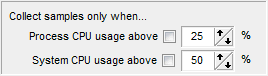
The main addition is the ability to have sampling conditioned by CPU usage, ie. only gather profiling information when the CPU usage is high, either for the system or the process.
This was added with three goals in mind:
- eliminate all that happens when the CPU isn’t busy from the profiling results, making it easier to focus on the CPU bottlenecks that matter.
- gather profiling information only when the system is under stress, and find out if your code copes well with system stress… or is a poor OS citizen and just adds to the trouble.
- identify sources of high CPU usage in your code, that could be reducing battery life when running on a mobile platform.
Note that CPU-usage based sampling can have the side-effect of eliminating I/O and other waits from the profiling results, so if your application’s bottlenecks aren’t CPU-based, you could miss them.
Other changes are support for the “Pause” key to pause profiling, time limit for sampling collection now starting from the first time sampling is enabled (rather than application start) and support for multi-selection when opening results.
This is also the first SamplingProfiler version compiled with Delphi 2009, oddities are not known at this point but expected. For all bug reports & suggestions, head to the forums.
Eric News Bottleneck, CPU, Download, Pause, Profiler, Stress, Tips
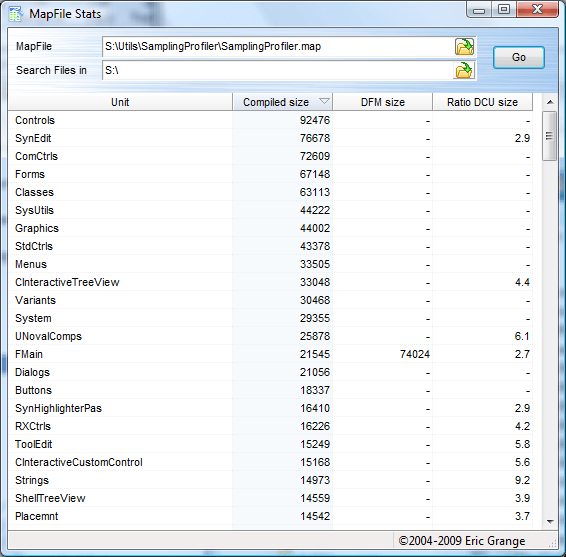
MapFileStats is a simple free utility to obtain executable binary size statistics derived from a “.map” file.
Use it to know which units contribute the most to an executable’s size, which DFMs are the largest, which units you have dependencies on but barely use in your executable, or merely to know exactly what gets into your executable.
You can integrate it into the Delphi IDE via the Tools menu, see the MapFileStats page for more details or to the download page and see for yourself!
Eric News Download, IDE, MAP, MapFileStats, Site, Size, Statistics, Tools