Archive

Posts Tagged ‘GLScene’

Hello WebGL source code
June 21st, 2012
Comments Off

With SmartMS v1.0.1 out you can now use WebGL!

Download HelloWebGL.zip (51 kB), it contains the first demo (in .opp form and pre-compiled), as well as the initial WebGLScene units which you’ll have to copy to your “Libraries” folder (the WebGL import units should have been delivered in v1.0.1).

  • GLS.Vectors: contains vector manipulations types as well as a collection of helpers to operate on them.
  • GLS.Base: contains Pascal classes to simplify basic OpenGL tasks revolving around buffers and shaders.

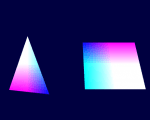
Quick tour of the demo (or how to setup and use WebGL)

In TForm1.InitializeObject, the WebGL graphic & rendering contexts are created, this will be simplified and wrapped more neatly by a component in the future, currently it just piggybacks a TW3GraphicContext, but it stays rather simple:

canvas := TW3GraphicContext.Create(Self.Handle);

gl := JWebGLRenderingContext( canvas.Handle.getContext('experimental-webgl') );

rc := TGLRenderingContext.Create;
rc.GL := gl;

The TGLRenderingContext is a container class for the JWebGLRenderingContext that the other helper refer, it’s currently quite bare-bones.

In SetupScene, the OpenGL scene is initialized, it begins with classic OpenGL initialization code, which the above mentioned future component should take care off one day:

gl.clearColor(0.0, 0.0, 0.25, 1.0); // Set clear color to black, fully opaque
gl.clearDepth(1.0);                 // Clear everything
gl.enable(gl.DEPTH_TEST);           // Enable depth testing
gl.depthFunc(gl.LEQUAL);            // Near things obscure far things

Note that since gl is exposed by JWebGLRenderingContext as an external class, the function names are case-insensitive as usual in Pascal, you can follow the JavaScript case, but you don’t have to.

Then comes the raw geometry buffer, that uses a TGLArrayBuffer helper, f.i. for the triangle you’ve got

triangleBuffer := TGLArrayBuffer.Create(rc);
triangleBuffer.SetData([
    0.0,  1.0,  0.0,
   -1.0, -1.0,  0.0,
    1.0, -1.0,  0.0
   ], abuStatic);

abuStatic is to indicate a static buffer (can be abuStream or abuDynamic as well).

This is followed by the shader setup, which uses GLScene helpers too, f.i. the fragment shader is created and compiled with

fragmentShader := TGLFragmentShader.Create(rc);
if not fragmentShader.Compile(#"
   precision mediump float;
   varying vec4 vColor;
   void main(void) {
      gl_FragColor = vColor;
   }") then
   raise Exception.Create(fragmentShader.InfoLog);

The vertex shader is created & compiled similarly, then both are linked into a shader program:

shaderProgram := TGLShaderProgram.Create(rc);
if not shaderProgram.Link(vertexShader, fragmentShader) then
   raise Exception.Create(shaderProgram.InfoLog);

Note that the shader program automatically builds a cache of uniforms and locations, and you can also use the AttribInfo[] and UniformInfo[] properties to enumerate attributes and uniforms.

Finally the Render loop is where you can see the vector & matrix helpers at work.
Since OpenGL ES 2.0 doesn’t include matrix stacks, you have to do them on your side, but this is easily achieved with a dynamic array’s Push() & Pop() pseudo-methods.

const
   cSpeed = 24*3600;
var
   projMat, mvMat : Matrix4;
   mvStack : array of Matrix4;
begin
   gl.ViewportSet(0, 0, canvas.Handle.width, canvas.Handle.height);

   gl.clear(gl.COLOR_BUFFER_BIT);

   shaderProgram.Use;

   projMat := Matrix4.CreatePerspective(45, canvas.width/canvas.height, 0.1, 100);
   mvMat := Matrix4.Identity;

   shaderProgram.SetUniform('uPMatrix', projMat);

   gl.enableVertexAttribArray(vertexPosAttrib);

   mvMat := mvMat.Translate([-1.5, 0, -7]);
   mvStack.Push(mvMat);

   mvMat := mvMat.RotateY(Frac(Now)*cSpeed);
   shaderProgram.SetUniform('uMVMatrix', mvMat);

   triangleBuffer.VertexAttribPointer(vertexPosAttrib, 3, false, 0, 0);
   gl.drawArrays(gl.TRIANGLES, 0, 3);

   mvMat := mvStack.Pop;

   mvMat := mvMat.Translate([3.0, 0, 0]).RotateX(Frac(Now)*cSpeed);
   shaderProgram.SetUniform('uMVMatrix', mvMat);

   squareBuffer.VertexAttribPointer(vertexPosAttrib, 3, false, 0, 0);
   gl.drawArrays(gl.TRIANGLE_STRIP, 0, 4);

The last bit I didn’t mention is the requestAnimationFrame shim, which is used to keep things rotating/animating, and which should at some point become part of the VJL or RTL.

So that’s about it for the walk-through!

News , ,

WebGLScene: something is brewing in the lab

May 31st, 2012

This is an informal announcement that work has begun on WebGL and bringing some of GLScene browser-side!

If you’ve got a a WebGL-capable browser (see “compatibility” below) click on the following links to see it in action:

There is a simple variation on the classic NeHe tutorials templates and a first try at a heightfield, built at runtime with automatic normal computations on the JS-side, and illumination on the shader-side.

Compatibility

  • Chrome: since Chrome 18, Google bundled SwiftShader, a software rasterizer, meaning that WebGL is now available everywhere (in hardware or in software).
  • FireFox: on the desktop, availability depends on hardware + drivers. Mobile FireFox for Android also supports WebGL (at least it runs on my old HTC Desire, which is of the same generation as Google Nexus One).
  • Opera: should also support it from version 12 both on desktop and mobile. Opera 12 on Android runs the above POCs on my HTC too.
  • Safari: under MacOSX WebGL should be supported (couldn’t test that), though Windows Safari doesn’t support it. As of iOS 5, WebGL is only supported for iAds in iOS.
  • Internet Explorer: not supported out of the box, but you might be able to use extensions like IE WebGL or Chrome Frame.

Is WebGL ready just yet?

If you scout the web, you’ll find multiple things are missing, especially from game usage point of view, things in the environment (such as going fullscreen, capturing the mouse or preventing screen rotation on mobile devices), or in the advanced rendering capabilities (multiple render targets, double precision buffers, NPOT mipmaps…) however those limitations are getting spec’ed right now by the Khronos group, and they are not relevant for a whole variety of visuals: simpler games, business graphics/visualization, education animations, static 3D representations, etc.

So, no, it’s not really for prime-time for all uses, but it’s certainly starting to become usable if you’ve got some control over the browser or the target hardware.

Architecture

This isn’t going to be  a straight port of GLScene, but more of a rewrite, based on ideas that were discussed a few years ago for GLScene 2.0. So the architecture will be different from that of FireMonkey’s 3D too (since FMX is based on DXScene’s, which is essentially a cut-down version of GLScene’s with cross-API drivers), it will be an architecture targeted from the ground up at shaders, OpenGL ES 2.x+ capabilities and extensibility.

A key difference is that the renderer and the scene-graph won’t be tied together, but separate, and the materials will be separate as well. I’m also planning to have a shader synthesizer early on, so classic material properties and lighting modes can be recreated easily, without having to write a single line of shader code.

Another item in the plan is to leverage partial classes, as a way for renderer and scene logic operating on the scene-graph to inject custom properties and methods, without having them built-into the core scene-graph classes, or go through registration schemes. This should hopefully allow the core classes to remain light, highly focused, and help combat bloat in the long run, by allowing extra features to stay purely optional, even if they require introducing interfaces or new virtual methods right at the root scene class level.

Availability

The lead platform is going to be SmartMS/DWScript, core units will rely on some advanced language features (like partial classes or generalized helpers), but with a long term goal of supporting other Pascal dialects as well (those that catchup feature-wise).

In the next SmartMS version, WebGL import unit will be available. They’re based on the WebGL specs, and provide external classes and constant declarations, so you can use WebGL with compile-time strong type checks, and edit code with ctrl+space suggestions.

Coming alongside are the WebGLScene units, which provide a set of vector/matrix maths routines, helpers for vertex buffers, shaders and texture objects, as well as what is currently the embryo of scene-graph.

News

Delphi XE2 VCL Styles and 3D

October 24th, 2011

…or when the old/new VCL mule shows it can still kick!

I was asked how hard it would be to do yet-another-Cover Flow-clone with VCL+GLScene, and how that would stand vs using FireMonkey on Windows.

GLFlow : VCL + OpenGL

The new Delphi XE2 Styles allow to get a nice looking UI, allowing to mix 3D graphics more smoothly without grayish controls getting in the way:

GLFlow - Powered by Delphi XE2 & GLScene

You can get the source and a pre-compiled executable from googlecode for a more interactive experience or a peek at the source code.

Note that in the video below, image load times have not been edited away: it’s actually near instantaneous (unsurprisingly so, the FireFlow sample pics are small ones)

The pictures above are those from FireMonkey’s “FireFlow”‘ sample, which you’ll already have if you have Delphi XE2 and have updated your samples directory.
You can select any folder with JPG pictures (and compare vs FireFlow), for instance on pictures from a digital camera (like these).

Now for some highlights:

  • High frame-rate
    • even if you shake the slider or click on pictures to the far right/left
    • no need for a gaming 3D card, even Netbook GPUs are enough
  • Fast loading of images in a background thread
    • almost instantaneous for the FireFlow samples
    • you can still interact while the loading takes place
    • works around the old TJPEGImage locking bug (QC43018, QC55871…)
  • Can handle large JPEG images
    • takes advantage of built-in TJPEGImage facilities for quicker loading  & downsizing.
  • Can animate with dozens of pictures without slowdown
    • benefits from built-in frustum culling (doesn’t draw what isn’t visible)
  • No pixel shimmering thanks to anisotropic filtering
    • GPU-accelerated mipmap generation

The amount of code used in GLFlow is actually lower than in the FireFlow sample, despite the extra features. Beyond the loading phase, everything is handled by the GPU, and this performs well even on low-end integrated 3D chipsets (gaming hardware not required, even mere Atom Netbooks can handle it just fine). FireFlow on the other hand seems to require a fast GPU and a fast CPU (it can maximizes one core when animating, maybe an issue in the animation classes?).

Interestingly enough, apart from VCL styles, there is nothing truly “new”: it could have been done almost the same back in Y2K with GLScene and Delphi 5 (if less pretty).

For the cross-platform fans, compiling it for the Mac (with LCL instead of VCL)  is left as an exercise ;-)

I’ve placed the source on google code, as CoverFlow is well, trendy and pretty, and can come in handy. There are also quite a few low-hanging improvements I may improve upon later on (having multiple background loaders, further texture optimizations, cross-platform through LCL, adding text below the pics, etc.).

News, Tips , ,

FireMonkey’s TCube & Tessellation

October 17th, 2011

a cubeIf any of you had a look at FireMonkey’s TCube object, you might have noticed rendering it is quite slow and quite complex.

If you were curious enough to look at the code, you might have noticed that TCube is actually a static mesh made up of 452 vertices, 1440 indices and 480 triangles, instead of the 8 vertices and 6 quads (12 triangles) one could have expected.

That explains why it’s slow… and when looking at the indices, there are more oddities: some coordinates aren’t properly rounded (you can find -1.11759E-8 instead of zero), normals aren’t normalized, and the tessellation doesn’t seem to be the same for all the faces. There is probably an interesting story behind that cube…

That said, why would one want such a complex  cube? Though none of the uses described below apply to TCube, it allows to introduce the subject of tessellation.

Per-Vertex lighting

When lighting an object in 3D, there are two ways to go about it, the historical one (before pixel shaders) was to use per-vertex lighting, with per-pixel linear interpolation, aka “Gouraud shading”. In such a case, if the light is close to the cube, or if the cube is fairly large, you would have artifacts, because the lighting wouldn’t be computed everywhere.

Using GLScene, I’ve illustrated the effect below on a single face (click to enlarge) of the effects of subdividing on per-vertex lighting, you can also download the source + precompiled executable (403 kB) if you want to see it more interactively

Subdivsions and per-vertex-lighting illustration

The closer the light is to a surface, the more subdivisions you need, which means that to get correct lighting with per-vertex lighting, you need a fairly high triangle count. Hence this technique wasn’t too practical, and you usually had to go for tricks (such as using lightmaps, decals, etc.) or vary the subdivision dynamically to minimize the performance impact. F.i. even though the FMX TCube is quite heavy, it’s nowhere near as heavy enough to achieve good per-vertex lighting quality with a close light-source.

Nowadays however, you have hardware pixel shaders, which allow you to compute lighting not per-vertex, but per-pixel, so you can obtain an image similar to the rightmost one above, with only two triangles.

CubeDeformations and vertex shaders

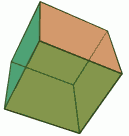
Deformations and vertex shader maths are one first use, like in the Blender picture to the right.

A common mesh manipulation tool, linked to deformation or extrusion tools,is to start from a basic geometric form, with more triangles than strictly necessary, and work on those triangles to achieve a not-basic geometric form.

Another use would be to make a dynamically deforming cube, that would bounce and warp at runtime. For that you would need a vertex shader or CPU-side geometry processing. A variant would be displacement maps, but that usually requires a high number of vertices.

In both those case however, you’ll obviously want to control how much the faces should be subdivided, and in practice, you’re entering the area of controlled mesh tessellation, and leaving that of a simple cube object.

Tips , ,

A look at the 3D side of FireMonkey

October 6th, 2011

This post was actually written sometime ago, alas XE2 Update 1 didn’t change much.

I’ve been looking at FireMonkey 3D side, by that I mean strictly the 3D side, not the UI components, or the 2D. Here are some observations, most born from maintaining and developing 3D software in C++ and later with GLScene, and with an eye to eventually porting some of GLScene code to FireMonkey (after all, most of GLScene’s code is actually linear algebra stuff, mesh manipulations, file format imports, etc. and not OpenGL-specific).

Note that everything below is fixable, most of it quite trivially, but Embarcadero has to lead by baking it into the framework, in the core classes & components. If they don’t and you implement it yourself, you’ll end up having to duplicate huge portions of the framework. Such a duplication will be a PITA when they realize they need it in the framework, and implement it… in a fashion that will likely be incompatible with yours.

Also note that implementing some of these will require either interface-breaking changes, still possible now IMHO, as FMX is still young, or hacks/workarounds later on (what happened with GLScene, might as well avoid that if they can).

Scope

FireMonkey is officially pitched at “Business” 3D (as opposed to 3D games), which isn’t that far from what GLScene is used for, as even if GLScene is used for gaming purpose, its bread and butter was as much business as it was gaming (cf. the galleries here and here).

Assuming we’re restricting the scope to real-time rendering engines, what differentiates a game engine for a 3D engine? In terms of pure functionality and capability, there is little specific, Unreal Engine f.i. encompasses a broad range of visualization and UI applications, the most differentiating factor is what the engine processes:

  • A 3D game engine typically sits at the end of an assets tool-chain, and handles “ready to use” meshes, textures, shaders and other assets. The tool-chain is supposed to pre-compile and prepare everything, so that the game engine only has to deal with the rendering and interactivity.
  • A business 3D engine on the other end sits at a higher level, it has to handle raw assets, which come out of simulations, data crunching, image libraries, etc. and do what’s needed to render them in robust, quality fashion, while handling gracefully a variety of situations and corner cases.

In the case of FireMonkey, target platforms are mobile devices, iPad and business machine GPUs: all these are rather low-end hardware, in terms of capability, performance and available memory. In other words, FMX can’t rely on having a powerful GPU with plenty of super-fast video RAM, but rather has to deal with paltry integrated chipsets which share RAM with the CPU.

Scene Graph

Like GLScene, FMX is based on a scene-graph, and more precisely a variant with roots and concepts from the ancient 3DStudio (DOS era), you can see cut down versions of them in FMX: the Camera/Target approach and the Dummy being the most obvious. Similar concepts exist in other scene graphs, but typically with different terminology and slightly different (cf. Ogre, Blender, OSG…).

The FMX scene-graph was however simplified/crippled in several ways:

  • the primary design-time orientation is absolute angles, that’s problematic because rotations aren’t commutative in 3D space, and there are such things as gimbal lock to cause trouble. If relative rotations are practical beyond simple demos, for real world use, absolute angles are not, you need well defined orientation, which means vectors (ie. matrix) or quaternions.
  • the camera model has been over-simplified, leaving out such key aspects as field of view, depth of view and near plane bias. While the first two are key for obvious reasons, the near plane bias is just as important. Because of the maths behind the depth buffer, it is the single most governing factor to numerical accuracy of the depth buffer (and minimize artifacts known as Z-fighting).
  • the scene graph is rendered hierarchically (see below).

The absolute angles orientation existed in GLScene from very early on, and over the years, grew to become a major source of frustration for users, ending up with tutorials dedicated to explaining why they were frustrating, and why you should move away from them.
Unless you’re an airman or accustomed to working in a roll/pitch/turn environment, rotations in 3D just won’t always behave as you expect they should. It was kind of a let down to see this mistake repeatedso prominently in FMX.

The hierarchical scene graph rendering was actually GLScene’s original approach, it’s one that feels quite simple and natural, but it also grew over the years to be a factor holding back the library, and had to be worked/hacked around in different ways. Once again, it was a disappointment to see that FMX was based on GLScene’s old approach.

A better solution is to separate the rendering from the scene graph, this is useful and even required in various scenarios:

  • required to render semi-transparent objects, all techniques for handling opacity require a non-pure -hierarchical rendering
  • facilitates handling of visibility culling, ie. not rendering what isn’t visible, because it’s off-camera, beyond the field of view, occluded by opaque objects, etc.
  • required for deferred shading and other multi-pass approaches (either for shading, shadow volume, etc.)

As a consequence, FireMonkey can’t even render scene graphs containing semi-transparent objects correctly if you don’t manually order them… That’s a major letdown.

Materials and Textures

This is another major roadblock, FMX is using approaches similar to the original GLScene one, that proved problematic and later had to be worked around.

The default material is very limited, and defined into the objects. A better approach (like later GLScene) would be to have them in a material library (which is to materials what an action list is to an action, it allows reuses and centralizes them). With Delphi XE2 property editors, this could have been done in a painless and convenient fashion.

The standard texture model is too limited too, not only are textures not shared (they should live in a library) they also lack basic properties. Sharing textures is key when you don’t have a lot of video memory, or when that memory is slow and not dedicated (like on an iPad, or a business PC). You also need at the very least to be able to control texture wrapping/clamping and texture filtering (mipmap generation and trilinear filtering at the very least).
The lack of mipmapping and anisotropic filtering have implications on performance and rendering quality, the lack of texture built-in texture compression support has performance implications. The COLLADA Viewer demo f.i. exhibits aliasing and pixel shimmering issues because of it.

Provision for 3D textures should also be made, those are almost useless in games, but useful in a business 3D engines (f.i. in medical visualization).

Shaders are for all practical purposes handled as if FMX was a pure game engine: you need pre-compiled shaders, you don’t have a unified cross-platform high-level shader compiler (like Cg) or generator component (writing shaders by hand gets old very fast, as it quickly becomes a combinatorial problem).

All in all, materials aren’t well supported by FMX at design-time, you’re left with having to write your own code to manage material libraries. That just isn’t what you would expect from a general purpose or business 3D engine.

Meshes

Once again, FMX goes for a limited approach similar to that of early GLScene versions: having a specific mesh object for each mesh format, and no standardized mesh format (well there is an embryo of one, but it’s too limited, and the COLLADA viewer skirts it f.i, the 3DS demo before it skirted it too). This is compounded by the scene-graph and materials limitations: the mesh object has to handle its own rendering and its own materials.

This is problematic because it means any form of advanced mesh-based algorithms have to be written against specific mesh objects. This impacts everything mesh-related from imports/exports, manipulations, optimizations, animations (skeletal animations, morphs, etc.) to rendering (extracting silhouettes, BSP, bounding boxes, occlusion etc.) to interaction (collision testing, etc.).

Cadencing

When doing animations, be it a simple following of a spline path or simulations, you need to refresh the display periodically, after having all the scene elements updated.

Typically that involves a so called “game timer”, which triggers at a fixed frequency (usually that of the display, or a fraction of it), along with a frame stepping/progression logic that can handle frame skipping (so that you don’t end up having the UI lag the user when the hardware can’t keep up). You also need a time reference, preferably global and not looping.

Well, FMX only has an embryo of such an architecture, and it is not pervasive. Also the cross-platform time reference (TPlatform.GetTick) returns a single precision floating-point value that can loop… double ouch. Might as well take the opportunity of a new framework to Do It Right.

In GLScene, cadencing wasn’t in initially, and adding it after the fact took time, especially to make it pervasive, pity FMX didn’t build it right into the framework.

Conclusion

All the above points are fixable, but they’re also fundamental missing aspects for doing 3D with FireMonkey, if you don’t want to replicate huge portions of the framework (cf. the COLLADA Viewer sample).

They mean that if you want to achieve anything beyond a few poorly texture objects, you’ll need to design and write a lot of custom code rather than rely on the framework… with obvious implications of obsolescence and compatibility issues whenever FMX finally gets the features in standard.

Tips ,

GLScene source code used in FireMonkey?

September 5th, 2011

Dan Bartlett spotted some GLScene source code in FireMonkey, see this thread in the Embarcadero forum for details, parts of the VectorGeometry.pas, Spline.pas and raycasting code have been identified. The code having been incorporated in closed-source code (KSDev’s, Delphi XE2) it hadn’t been spotted or reported so far (at least to my knowledge).

edit: snippet posted in the comments, < & > lost, but you’ll get the idea.

edit 2: I’ve been contacted by Embarcadero, the code is being looked into, rewritten/replaced to get out of MPL where needs be, and everything should come to a happy conclusion.

FWIW, neither Embarcadero nor KSDev have made any closed-source or special non-MPL agreement with the original authors, so technically speaking, they’re in breach of license.
For the parts mentioned above, the original authors would be mostly me, Mike Lischke, and whoever you can see mentioned in the Sourceforge CVS/SVN log at the date the code was copied, so they’re not in the big trouble they would be if they had ended up using Oracle’s code or Apple’s drawings ;-)

GLScene being under MPL, it should be reasonably easy for Embarcadero to get into compliance, to quote wikipedia:

all distributed copies must contain the source code, all modifications must be described in accompanying documentation, all necessary patents must be described in accompanying documentation, all copies of the code must have a statement of copyright attached, and all modified code must be distributed under MPL, although new files containing new code need not be distributed under MPL.

And also:

The way in which the Mozilla Public License is drafted basically requires subsequent users to license the original code under MPL and all additional code under any kind of license

Meaning in short that all compiled FireMonkey applications should have a copyright statement about GLScene (in the about box f.i.), and if you modify FireMonkey source files yourself, depending on what you modify, you could fall under MPL and you would have to publish those modifications.

KSDev applications released in the wild should also have that copyright statement added, btw.

Note that you don’t have to physically include the MPL source code with the binaries, as long as you provide a link to a website hosting the code (in this case GLScene.org or the SourceForge page).

News , ,

glInfo for Android

June 10th, 2010

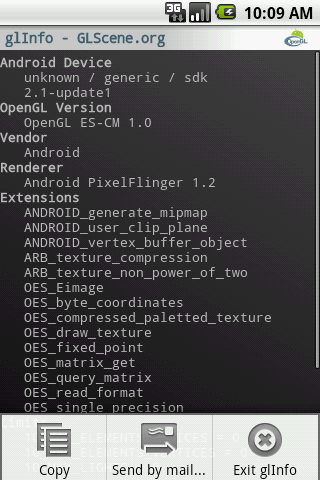
Just published glInfo in the Android Market, this is a simple utility that provides information on the OpenGL ES driver of the device it’s running on (version, supported extensions, limits…) and allows to copy or mail the whole report.

Its purpose is to facilitate gathering device OpenGL ES support information, when the device you’re targeting or have issues with is in the hands of a non-developer… or in the hands of a lazy developer ;)

It is named after from the glInfo utility that used to be hosted at Tom Nuydens’s Delphi3d site.

News , , ,

GLScene status

June 7th, 2010

I’ve updated the GLScene.org main page with information on where you can find support newsgroups and forums, since the nntp newsgroup went down and are unlikely to come back up (thanks Paul Van Dinther, now from PlanetInAction, for the help in accessing the wiki).

The old site has been resurrected there too, as the wiki engine lost most of the images added during the last years… I’ll be looking into setting up something to replace both with a more functional content manager.

The reason behind this dust being shaken is that I’ll likely be initiating a GLScene for Android project (for Java / Dalvik).

News ,