Archive

Posts Tagged ‘IDE’

begin…end as bottlenecks?

March 25th, 2009

There will come a time when SamplingProfiler may report you that begin or end are your bottlenecks. This may sound a little surprising, but it’s actually quite a common occurrence, and something that instrumenting profilers are not going to point out, so it might be worth a little explanation.

This can be illustrated it with the minimalistic example of an array property getter. Witness the innocuous looking code below:

function TMyList.GetItem(index : Integer) : T;
begin
    if (index < 0) or (index >= Count) then
       Error(index);
    Result := FItems[index];
 end;

Nothing out of the ordinary there, you can find similar looking code in practically every array-based collection in the RTL and many third party libraries. But someday, that GetItem will be bottleneck, and you could be left looking at code profiling results like those:

begin-end-critical-01

Yes, those are the are the begin and end lines taking up more than 70% of the CPU time spent inside GetItem
You knew it! Sampling profilers are unreliable… or are they? Surely the index range checking must be the culprit? or the assignment and the reference counting business? Well, they could be, but in this case they aren’t.

To understand why, let’s have a look in the CPU view. Place a breakpoint on your begin, run up to there and hit Ctr+Alt+C, here is what you could see:

begin-end-critical-02

That’s a whole lot of traffic to the stack: 3 registers saved, 3 copies. Those things aren’t free, they can dwarf what your explicit code does, and in this example, they do. We didn’t even have any local variables, if we did, they would have taken setup and teardown code, and this code would have been “hidden” in begin and end too.

This illustrates a difference of sampling vs instrumenting profilers: the ability to pinpoint an actual bottleneck, even if it is “outside” of your explicit code, so you can find where the actual bottleneck is, and don’t waste time trying to optimize what isn’t critical.

Now what can you do to improve things locally? With generics, an interface type and Delphi 2009 sp2, nothing much, short of going BASM. The bottleneck code is compiler-generated, optimizing the assignment or the range checking would only provide minimal benefits. If you want to go faster, you’ll have to reduce the number of calls to GetItem, ie. open that “Show Callers” pane, have a look there, and solve the issue at the higher-level routines that are involved.

But there are other situations in which you can influence the auto-generated begin/end code, the solutions then typically revolve around distributing the code across smaller local functions or methods, tweaking your variable usage, separating branches, or if all else fails, going BASM… but that is food for future posts!

Eric Tips , , , , , , ,

MapFileStats public release

March 12th, 2009

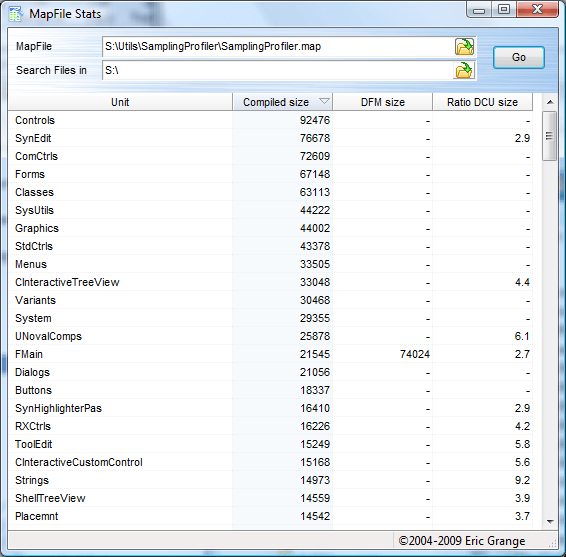
mapfilestatsMapFileStats is a simple free utility to obtain executable binary size statistics derived from a “.map” file.

Use it to know which units contribute the most to an executable’s size, which DFMs are the largest, which units you have dependencies on but barely use in your executable, or merely to know exactly what gets into your executable.

You can integrate it into the Delphi IDE via the Tools menu, see the MapFileStats page for more details or to the download page and see for yourself!

Eric News , , , , , , ,

Using SamplingProfiler from the IDE

February 27th, 2009

SamplingProfiler comes as a stand alone-application, but it’s also ready for integration in the IDE via the Tools menu. Go to the Tools menu configuration and add an entry for SamplingProfiler. Set the parameters field to $EXENAME. Voilà!

From now on, when working on a project, you can compile and then hit the SamplingProfiler entry in the tools menu, it will open on your current project executable. If you saved a profiling project (.spp file) alongside your executable, it will be loaded automatically too.

Eric Tips , , , , , ,