 Time for some summer fun! Someone asked in the delphi win32 newsgroup how to prevent users from doing a “Print Screen”. The answer to that is that you can’t really, since screen capture can be invoked from other applications, or your app can be hosted in a Virtual Machine, accessed over RDP, or a frame can be grabbed directly from the screen cable.
However all hope is not lost! Even if you can’t defeat a “Print Screen” or screen capture, it’s possible to make such a capture useless.
Defeating any casual PrintScreen
Any worthy accomplishment requires sacrifices, and this one is no different. Assuming inducing end-user headaches or epileptic seizures is acceptable, you can defeat any single casual “Print Screen”, screen capture or frame grab with the help of visual cryptography and retinal persistence.
The trick is that a “Print Screen” will capture exactly what’s on the screen at a given time, so if you ensure that at any time, you only have random noise on the screen, then the screen capture is possible, but useless as only random noise will be captured. This is where visual cryptography comes in.
The idea is to generate two (or more) images that will individually be random noise, with no information as to the content they crypt, and when combined the information becomes visible again.
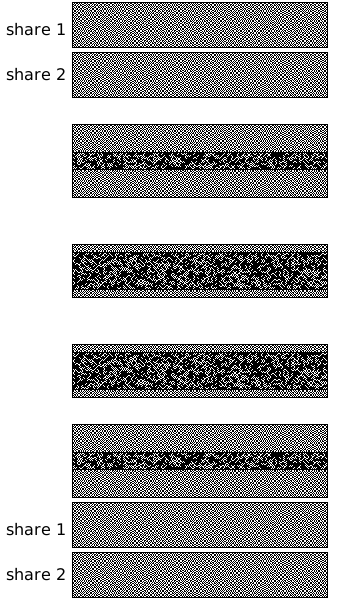
Classic Visual Cryptography
Visual cryptography does it by superposing two (or more) transparent slides (see the wikipedia article for details), and using transparency, that approach isn’t directly applicable to our “Print Screen” problem, but a variation can be devised where instead of using transparency (an “OR” operator), we’ll be using retinal persistence (an “AVERAGE” operator).
Show me the code!
To achieve that we only need to tweak slightly the Virtual Cryptography image generation, for instance the following code will take a black/white image in bmpOrig and generate two “crypted” images in bmpOne and bmpTwo:
const
   BoolToColor : array [False..True] of TColor = ( clBlack, clWhite );
...
for y := 0 to bmpOrig.Height-1 do begin
   for x := 0 to bmpOne.Width-1 do begin
      b := (Random(255) and 8) <> 0;
      bmpOne.Canvas.Pixels[x, y] := BoolToColor[b];
      if bmpOrig.Canvas.Pixels[x, y] = clWhite then
         b := not b;
      bmpTwo.Canvas.Pixels[x, y] := BoolToColor[b];
   end;
end;
Basically the first image is pure random, the second is a variation of the first with colors flipped depending on the original image. So taken in isolations, both images are effectively random, and provide zero information about the original image (assuming your Random function is not predictable enough, which isn’t the case with Delphi’s Random, but let’s ignore that).
What happens in detail is that:
- White becomes either Black + White or White + Black
- Black becomes either Black + Black or White + White
So White becomes perceptual Gray, and Black becomes a static White or static Black. Obviously, that’s not too pretty and will only gain you appreciation from the denizens of the MoMA, but that’s enough information for the eye to figure things out.



🙂
I guess I can take multiple screenshots…
Reminds me of “Emerging Images” from SIGGRAPH Asia 2009: http://www.youtube.com/watch?feature=player_embedded&v=z7bbU5VOfHY
People still print stuff?
@QualityCoding.info
“Print Screen” copies the screen to the clipboard, you can then paste it wherever you wish (mail, word doc, etc.)
@Nelson Chu
Interesting application!
@JC Chu
Yep, you’ve got to grab at least the two images, then combine them in a paint program.
Another way is to capture a screen video (with FRAPS f.i.), and play it back through with de-interlacing forced one (which will perform the average). Also video compression algorithms can also result in making the hidden image visible on their own (without requiring de-interlacing).
Summer fun indeed ^.^
Why do this at all, though?
Remember, folks, your software is running on other people’s property. They are the owner of the computer they’re running it on. You are not. Your software should behave itself as a guest in someone else’s home. If it barges in like it owns the place and starts trying to restrict what the computer’s owner can do, it’s no different from malware and the user has every justification to treat it as such.
Not all computer and sofwtare uses happen at home 😉
I’ve definetely seen that kind of functionality requested in corporate and military environments, where the user is an employee/soldier, and owns neither the machine nor the data.
The treshold then is for the limiter to be strong enough that the user can’t casual capture sensitive data by mistake or inattention, and has to demonstrate malicious intent.